In the app today
Ask Sage about your kitchen.
Ask about your recipes, your stock and what things cost, even before setup is done. You can check the records behind every answer. If it drafts a shopping list, you create it or discard it.
Founding offer open now: 15 days free, then $49/month per kitchen, locked in for life. Limited to the first 20 kitchens. Regular price $99/month per kitchen; unlimited crew. Prices plus tax. Card required; $0 today. Cancel before day 16 in Settings → Billing, no call required. What to prepare · Plan and team limits
Read what the film shows
- Ask Sage beside the screen you are working on.
- It answers from your records: $7.28 a portion, and why.
- Every line links to its record. Sage changes nothing on its own.
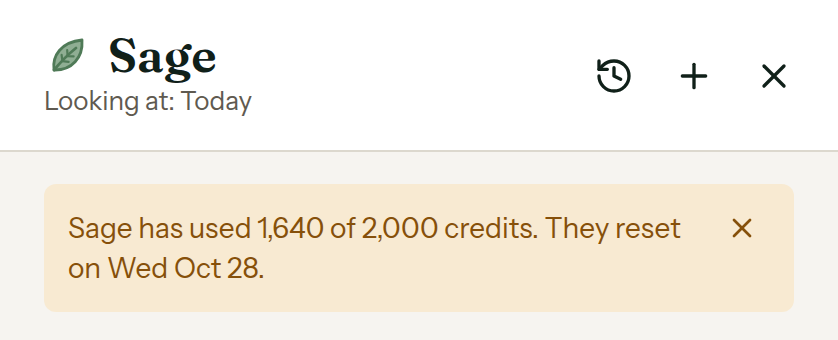
- Sage warns you once 80% of the month’s credits are used.
- 2,000 Sage credits each paid month, 300 during the free trial.
The number arrives with its record.
One answer, held still so you can read every line: why does the short rib cost what it costs?
- Cost per portion
- $7.28
- Biggest line
- Beef short rib, $7.00 (96%)
- Evidence
- 3 cited lines
- Source
- Recipe · Braised Short Rib
When a line has no record behind it, Sage says so instead of filling the gap.
A missing number is an answer, too.
Questions you can ask. A shopping list you can approve.
Sage is for owners and managers. It pulls the records that matter and shows you what it found.
- 01
“What needs my attention for Saturday?”
Reads the same attention list the Today screen shows, for one date or all of them.
- 02
“What else is on that date?”
Lists the orders on a day: name, guests, status, drafts included.
- 03
“What should we prep for Saturday?”
Builds the prep view for one date from the orders already on the books.
- 04
“Which ingredients are below par?”
Reads trusted inventory counts and names ingredients below the par you set.
- 05
“Why does this dish cost what it costs?”
Walks the recipe line by line, with each line’s share of the plate.
- 06
“Find the chicken recipes”
Searches recipes by name and the ingredients they use.
- 07
“Which recipes contain sesame?”
Finds the recipes whose ingredients carry a reviewed allergen.
- 08
“What is the nutrition for this recipe?”
Shows recipe nutrition and tells you which nutrient values or unit conversions are missing.
- 09
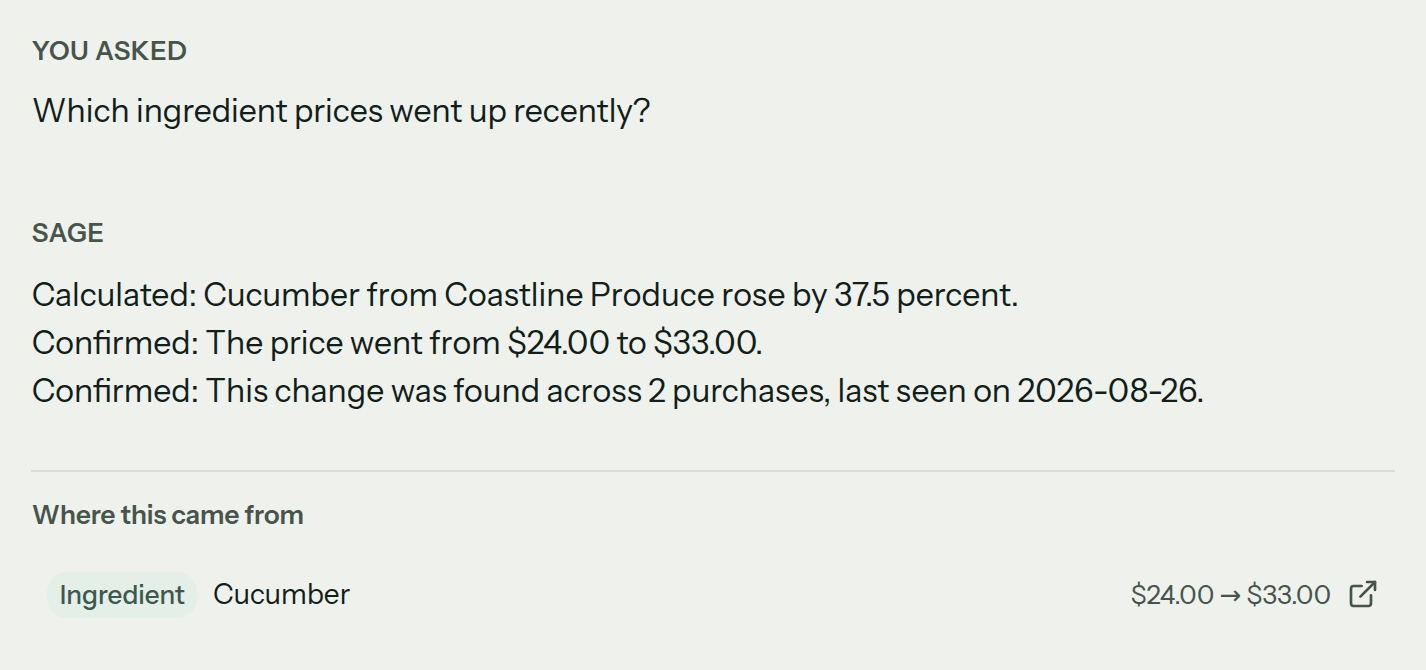
“Which prices went up?”
Reads the purchase ledger for price moves and says how many purchases the move rests on.
- 10
“What came up short in receiving?”
Lists the open receiving follow-ups, without the supplier’s contact details.
- 11
“What is left in setup?”
Reads setup progress and points to the unfinished stage.
- 12
“Prepare the shopping list”
Drafts the kitchen’s list, or one order’s. You see what it creates and what it does not touch, then you press Create the shopping list or Discard this draft.
- 13
“Change Saturday’s draft order to 32 guests”
Drafts the guest-count change on a draft order. The price per guest holds, and the total follows once you press Change the guest count.
Ask before the kitchen is fully set up.
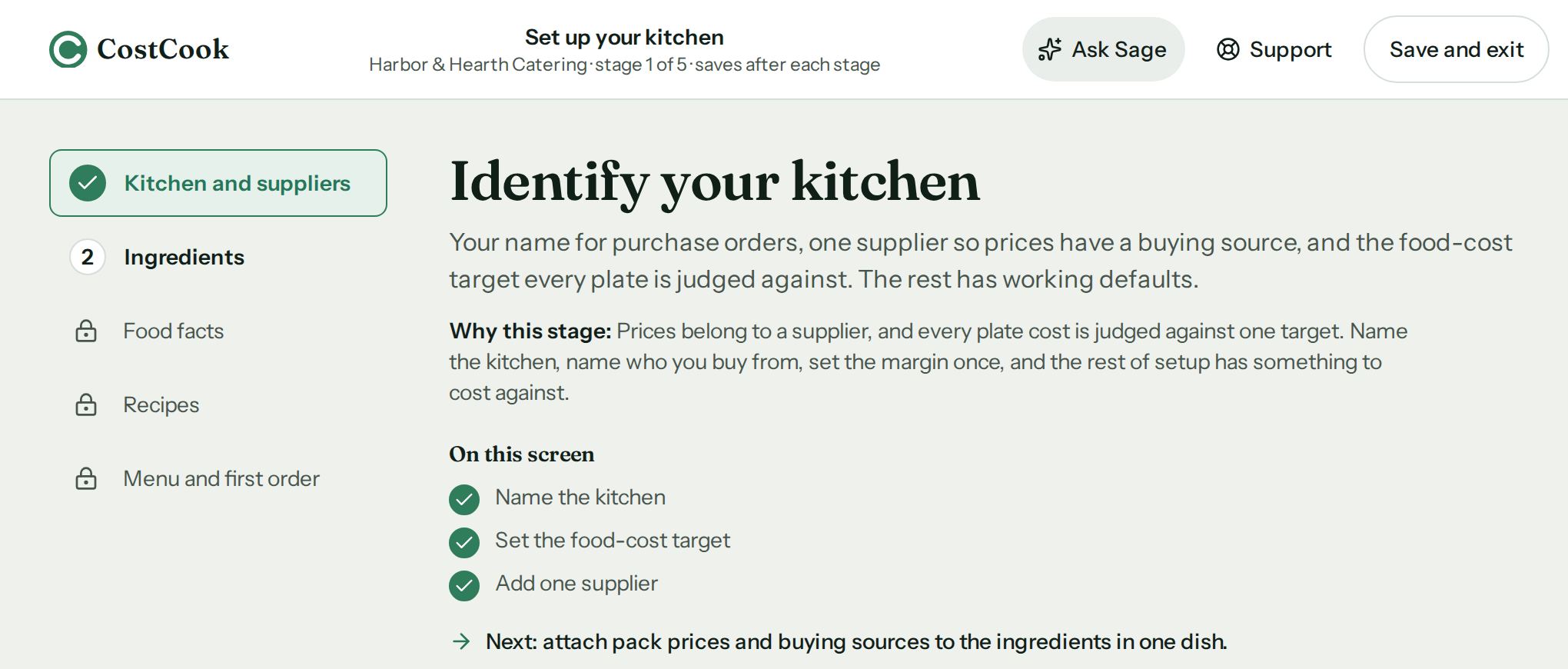
Sage does not pretend a half-built kitchen is finished. It works from what you have entered so far, tells you what is still missing, and keeps the way back to setup in view.
- Open it from setup
- Open Ask Sage from the setup header.
- Ask a question that fits
- Starting questions follow your setup stage and what you have entered, so an empty kitchen is not asked about orders it does not have.
- Keep your place
- Progress saves after each setup stage, and Back to setup returns to the unfinished stage.
You can see exactly where Sage stops.
Answering a question changes nothing. A draft stays a draft until an owner or manager approves it.
Every number has a source.
Links are built by the app, so an answer cannot cite a record it did not read.
It never changes a record on its own.
It does not send, buy, reprice or adjust anything. Before an approved draft is saved, CostCook checks the records again.
It cannot reach another kitchen.
Sage can only use records in the kitchen account you are signed into.
It is for owners and managers.
Staff cannot open Sage. The costs and price moves it reads stay with the people who see the money.
It says when evidence is missing.
Each line is marked as from your records, calculated, Sage’s read, or missing evidence. A check that did not complete is marked incomplete.
It runs on a fixed allowance.
Sage warns you before its credits run out. If they do, the rest of CostCook keeps working.
What it costs to run.
2,000 Sage credits each paid month, 300 during the free trial.
The credits come with the plan. There is no meter, and you cannot buy more. The billing page shows the count and the day they reset. Once 80% of them are used, the Sage panel says so. If they run out, Sage waits for the reset. Every other screen keeps working.
Questions owners ask first.
Is it live, what can it change, what does it cost, and who sees the money.
Is Sage available now?
Yes. Open it from the app navigation, or from the setup header while setup is unfinished.
How does Sage help during setup?
Ask Sage opens from the setup header with starting questions for your stage. Back to setup returns you to the unfinished stage, with your progress saved.
What can I ask Sage?
Sage has twenty-two read-only tools across the shift, orders, recipes, stock, buying and setup. It can also prepare three kinds of draft for an owner or manager to approve: the kitchen shopping list, one order’s shopping list, and a guest-count change on a draft order.
Can Sage change my kitchen records?
Not on its own. Its tools read records, and a draft changes nothing. An owner or manager approves or discards each draft, and CostCook checks the underlying records again before an approved draft is saved. If they changed, nothing is saved.
What happens when the evidence is missing?
Sage names the missing evidence or an incomplete check instead of filling the gap with a confident number. The answer still helps: it tells you what the record needs.
Is there a limit on Sage?
Yes: 2,000 Sage credits each paid month, 300 during the free trial. You cannot buy more. Sage warns you in its panel once 80% of them are used. If they run out, Sage waits for the reset and every other screen keeps working.
Can my staff use Sage?
No. Only an owner or manager can open Sage, because it reads the money.
Ask the next question. Keep the final say.
Check the record behind the answer, then get back to the kitchen.