Compare supplier prices by what you can use.
Put in the case price, the pack size and the trim yield for one ingredient. Compare suppliers per usable pound, kilo or item, and see which recipes a price change hits.
Founding offer open now: 15 days free, then $49/month per kitchen, locked in for life. Limited to the first 20 kitchens. Regular price $99/month per kitchen; unlimited crew. Prices plus tax. Card required; $0 today. Cancel before day 16 in Settings → Billing, no call required. What to prepare · Plan and team limits
Illustrative supplier comparison
Purchased by weight · usable after trim
$2.57 per usable lb
$2.59 per usable lb
The old price still looks right.
The invoice went up, but your spreadsheet still has the old number. By the time the food cost looks wrong, you may have already quoted the job to a client.
Set up the ingredient once. Every recipe uses it.
The buying unit, trim yield, conversions, suppliers, allergens, storage area and par level all live on the ingredient.
Chicken thigh
Protein · purchased by weight
- Purchase unit
- 20 lb case
- Trim yield
- 91%
- Purchased cost
- $2.34 / lb
- Usable cost
- $2.57 / lb
Add it where you run into it.
Start from scratch, from the USDA reference or from a purchase. Or add it inside the recipe you are already building.
Keep purchased and usable separate.
Both costs sit side by side. Trim and cooking loss show as numbers you can see, never buried in the price.
See what still needs a price.
The ingredient list shows which items can be costed and which still need a price or unit conversion.
Put both cases on the same pound.
Pack size and yield change the math. Each offer comes down to the same usable unit and keeps its source and date. Then you pick the price you want to use.
The source stays with the number.
- $46.80 Northline delivery, PO-1048
- $42.10 Northline purchase
- $61.50 Market Supply list, 25 lb case
See which recipes it hits first.
- Chicken pot pie4 lb in recipe+$1.03
- Grain bowl1.5 lb in recipe+$0.39
- Canapé tray1 lb in recipe+$0.26
Illustrative recipe impact from adopting the changed supplier price.
The price follows the ingredient into the recipe.
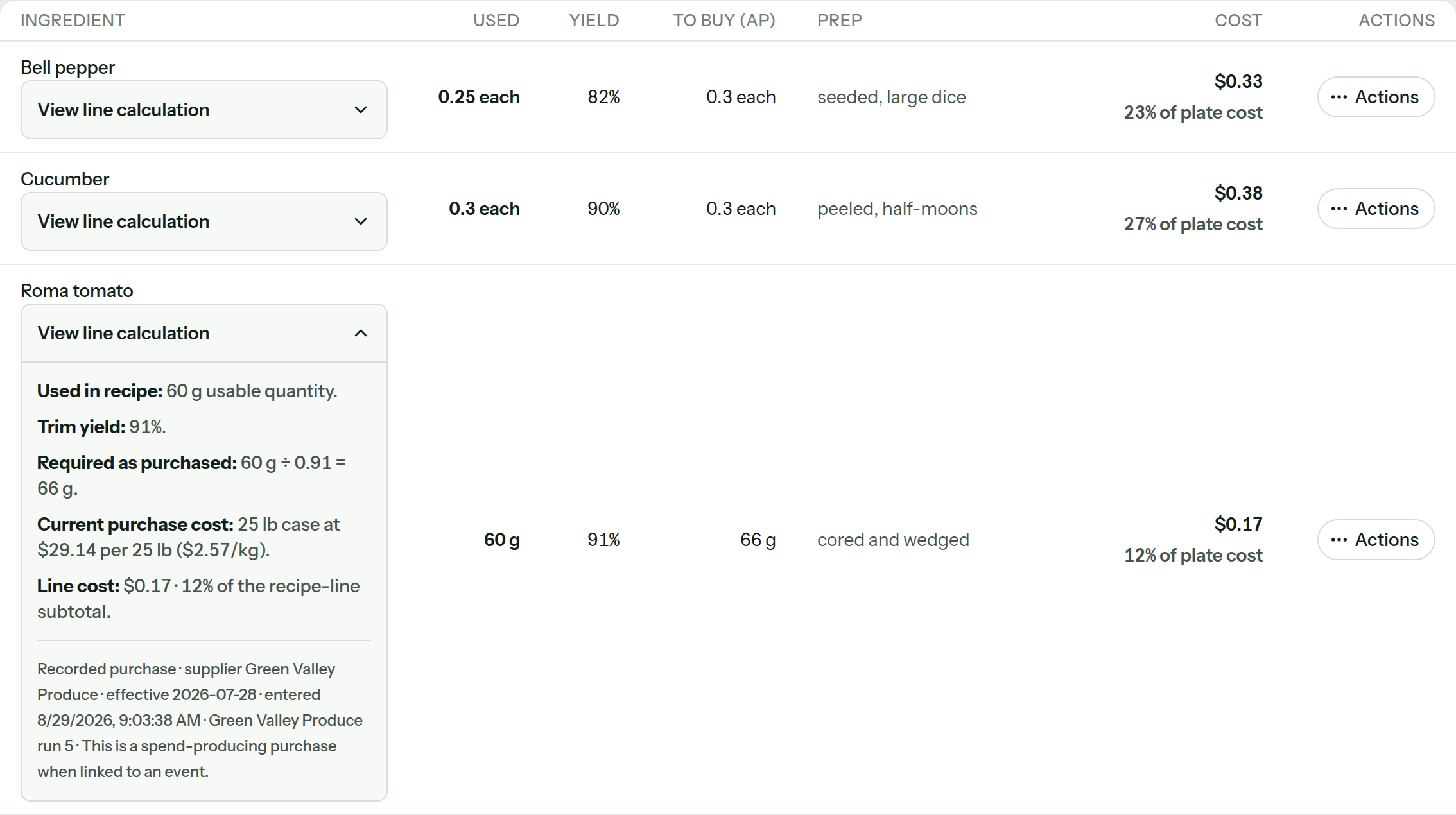
Inside a recipe the ingredient keeps its own line: what you bought, the trim yield, how much to buy, the prep state and what it adds to the cost.
- Missing prices are named instead of reading as zero.
- Every ingredient line adds up to the recipe total.
- Open the math whenever a number needs checking.
What is in Ingredients.
Open the details to check what is available today.
15shipped capabilities
Ingredients and supplier prices
- Missing ingredient details. See which ingredients can be costed and which need a price, yield or conversion.
- Shareable filters. Bookmark or share a filtered ingredient list and reopen the same search.
- Fix a price in place. Edit a pack cost right from the list without losing your filters.
- Three ways to add an ingredient. Create from scratch, from the USDA reference, or from a purchase. Unit and yield are your choice, never a guess.
- Mid-recipe creation. Add a missing ingredient from inside the recipe builder without losing what you typed.
- Suppliers anywhere. Add a supplier from any screen that needs one. Same form, same result.
- Purchased vs usable. Each ingredient shows both costs side by side, with its purchase history underneath.
- Compare suppliers. Compare supplier offers per usable pound, kilo or item, cheapest first. Choose which price to use.
- Price source. Every current price says where it came from, from which supplier, effective when.
- Affected recipes and menus. Before a price changes, see every recipe and menu it touches.
- Check before deleting. Before deleting an ingredient, check the recipes that still use it.
- CSV import. Bulk ingredient import with a template whose example rows actually pass.
- USDA reference built in. Yields, densities, and unit weights offered as chips you tap to fill.
- Allergens. Tagging for the nine major US allergens rolls up to every recipe, with chef overrides that require a written reason.
- Shelf facts. Storage areas and par levels live on the ingredient. An unset par is unset, not zero.
Frequently asked questions
What people ask before they trust a supplier price.
Can one ingredient have prices from more than one supplier?
Yes. Concurrent supplier offers sit on the same ingredient and compare per usable unit, cheapest first. You choose which offer becomes the current price.
How does CostCook compare different pack sizes?
Each offer keeps its pack quantity, purchase unit, price, and trim yield. CostCook converts those facts to the same usable-unit cost so a case and a bag can be compared on equal terms.
Where did the current price come from?
Every current price carries its source, supplier, and effective date. Purchase history remains underneath the ingredient instead of being replaced by one unexplained number.
What happens when a supplier price changes?
Before you adopt the change, CostCook shows the recipes and menus that use the ingredient. Once applied, recipes using it recost from the new ingredient price.
What if a price or conversion is missing?
The catalog names ingredients that still need a fact. Recipe totals that cannot be fully costed stay marked partial rather than quietly treating the missing line as free.
Can I bring in existing ingredient data?
Yes. Import ingredients from a CSV spreadsheet, or upload supplier paperwork. Review and confirm the suggested details before they change costs.
Know where every price came from before you quote.
Bring one supplier sheet and one real ingredient. Follow the case price into the recipe, with the math showing.