Labels and printing
In the app todayKitchen date labels, printed from Prep and Pack.
Pick how it is stored, the use-by date and how many containers, then print. The wording is saved, so a reprint says the same thing. Printing goes through your browser, onto the label stock you set once in Settings.
LABEL PREVIEW
How a label is made
Six steps at the bench, one record behind them.
Nothing prints until you say how the food is stored.
01
Tap Label where the food is.
On the prep list once a dish is done, the pack list, a recipe or an ingredient. Each opens the same label form, so you review the same details before printing.
02
Say how it is stored.
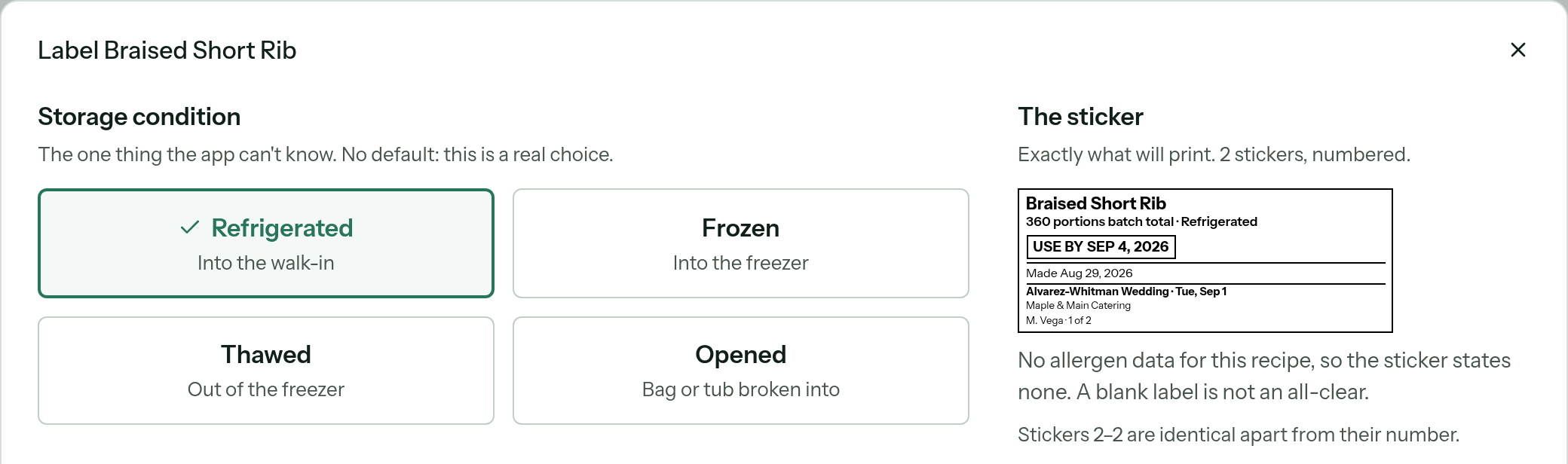
Refrigerated, frozen, thawed or opened. There is no default: the app calls it the one thing it cannot know, and nothing prints until you choose.
03
Settle the use-by date.
A saved shelf life for that recipe or ingredient, a number of days, an exact date, or the made date only. Where the app has a sourced suggestion it offers one, and tapping it is what saves the rule. A label never guesses a date.
04
Count the containers.
One label per physical container, numbered 1 of 10, 2 of 10. The batch total on the pack list is not what is in each pan, and the dialog says so.
05
See exactly what will print.
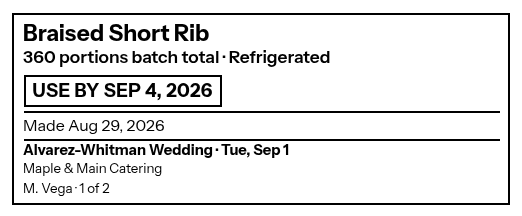
Name, batch and storage word, use-by and made dates, the event and its date on an order-tied label, the kitchen name, who printed it. Confirmed allergens print as Contains and May contain; with no allergen data the sticker prints no line, and the preview says a blank label is not an all-clear.
06
Print, and it is on the record.
The print opens your browser’s print dialog on stock the kitchen chose once in Settings, and what the sticker said goes on the record.
THE STICKER, AS PREVIEWED

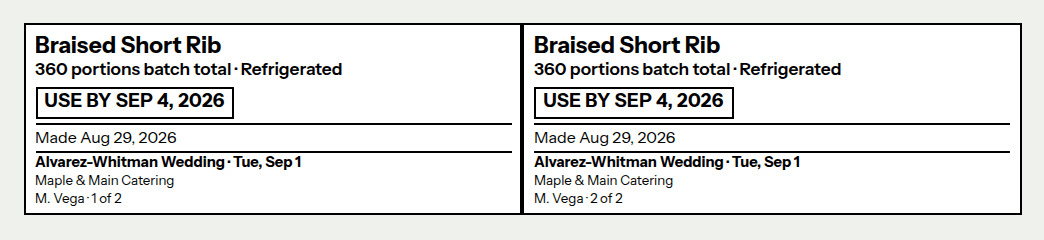
THE PRINT VIEW · REPRINTABLE

The record
A soaked sticker costs a tap.
Printing saves what the sticker said. The saved label has no stock size or printer baked in, so the same words go on a sheet today and a roll next month. A reprint six weeks on is the label that went on the container, not a fresh one built from a recipe that has changed since.
The record also keeps where the date came from: the recipe’s standing rule, or a number somebody typed at the bench. An inspector, or you, can tell which one later. That part does not print.
What it prints on
Set your label stock in Settings before the 5 a.m. rush.
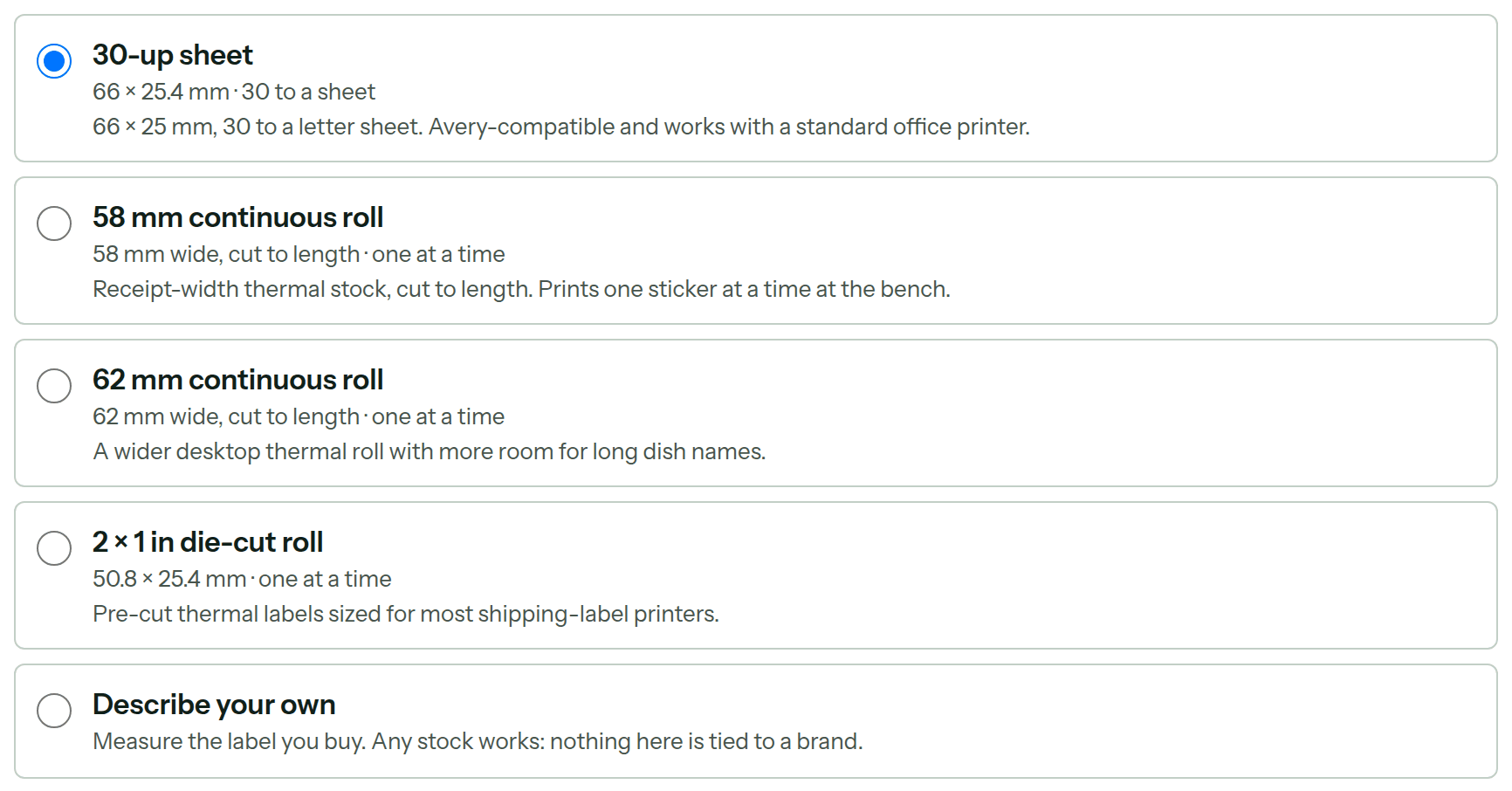
Sheet, continuous roll or die-cut roll, the label says the same thing. Only the size and shape change, measured in millimeters and not tied to any brand.
30-up sheet
2⅝ × 1 in (66 × 25.4 mm), 30 to a letter sheet
An office printer and a sheet of stickers.
58 mm continuous roll
2.3 in (58 mm) wide, cut to length
Receipt-width thermal stock, one at a time at the bench.
62 mm continuous roll
2.4 in (62 mm) wide, cut to length
A wider desktop thermal roll for long dish names.
2 × 1 in die-cut roll
2 × 1 in (50.8 × 25.4 mm)
Pre-cut labels sized for most shipping-label printers.
Describe your own
Any width from about ¾ to 8½ in (20 to 220 mm)
Measure the label you buy. Nothing is tied to a brand.
SETTINGS · LABELS AND PRINTING

What it is not.
- The only output is the browser’s print dialog. A direct connection to a label printer is not built; the app cannot confirm that paper moved.
- A blank allergen line is not an all-clear, and the sticker preview says so. Allergens print only from confirmed evidence on the ingredient.
- The app never picks a use-by date. A saved shelf life, a number you enter, an exact date, or the made date only.
Frequently asked questions
+Is kitchen label printing available now?
Yes. It is in the CostCook subscription you would start today.
+What does a label say?
The dish or ingredient, the batch quantity and storage condition, the use-by and made dates, the event and its date when the label is tied to an order, the kitchen name, who printed it, and its number in the run. Confirmed allergens print as Contains and May contain.
+Where does the use-by date come from?
From you. A shelf life saved on the recipe or ingredient, a number of days, an exact date, or the made date only. Where the app has a sourced suggestion, such as the FDA Food Code seven-day rule for refrigerated food, it offers it, and tapping it is what saves the rule. The app never guesses a date.
+What does it print on?
A 30-up sticker sheet on an office printer, a 58 or 62 mm continuous thermal roll, a 2 by 1 inch die-cut roll, or any stock you measure yourself. The kitchen chooses once in Settings. The sticker preview is sized in millimeters, so what you see is the printed size.
+Does it send labels straight to a label printer?
No. The output is your browser’s print dialog. A direct connection to a label printer is designed as a seam in the code and is not built, and the app does not claim that paper moved when it cannot know.
+What happens when I reprint?
The exact labels that were recorded print again, unchanged, even if the recipe has changed since. Only the paper can differ: a reprint can go on the stock the kitchen has loaded now.
Print what you chose. Keep the record.
Labels are in the same plan as the rest of it. Start the trial and print your first label off your own prep list.
Founding offer open now: 15 days free, then $49/month per kitchen, locked in for life. Limited to the first 20 kitchens. Regular price $99/month per kitchen; unlimited crew. Prices plus tax. Card required; $0 today. Cancel before day 16 in Settings → Billing, no call required. What to prepare · Plan and team limits