Build your menu. Check the price per guest.
Pick the dishes and how much of each goes on a plate. Add the date, the head count and your price. Check the food cost first. Confirming locks the quote and the kitchen plan together.
Founding offer open now: 15 days free, then $49/month per kitchen, locked in for life. Limited to the first 20 kitchens. Regular price $99/month per kitchen; unlimited crew. Prices plus tax. Card required; $0 today. Cancel before day 16 in Settings → Billing, no call required. What to prepare · Plan and team limits
- DraftMenu + 180 guests
- Review the number$26.93 food / guest
- Confirm$68.00 / guest quoted
Figures from the 180-guest sample event captured further down this page. The dishes shown are examples, not its cost breakdown. Food cost excludes labor, rentals, tax and profit.
The count changed in an email. The quote did not.
The dishes are in a menu document. The revised count is in an email. The number you plan to send is in a spreadsheet. Copying between them works fine, right up until one of them changes.
Know what the quote costs you before you confirm it.
A new event starts as a draft, and the food cost shows while you set it up.
When a client is waiting on a price, the same costed menu goes into a proposal they accept on their phone; see events and proposals.
- 1Menu
What goes on each plate.
- 2Date
Put the job on the calendar.
- 3Guests
The count the kitchen cooks for.
- 4Price
Hold it up against food cost.
- 5Confirm
Lock the plan and the money.
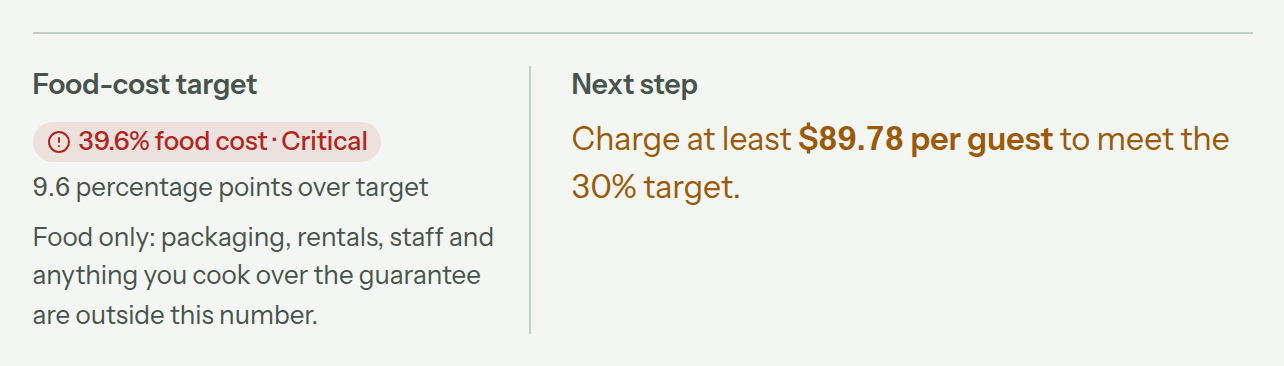
$68 a head, at 39.6% food cost.
For the 180-guest summer wedding in this screen, $68 per guest puts food cost at 39.6%. The same panel names $89.78 as the price that would meet the 30% target.
- The order price can override the menu default.
- Guest-count changes update the draft estimate.
- Over target, Confirm order waits on Fix the price.
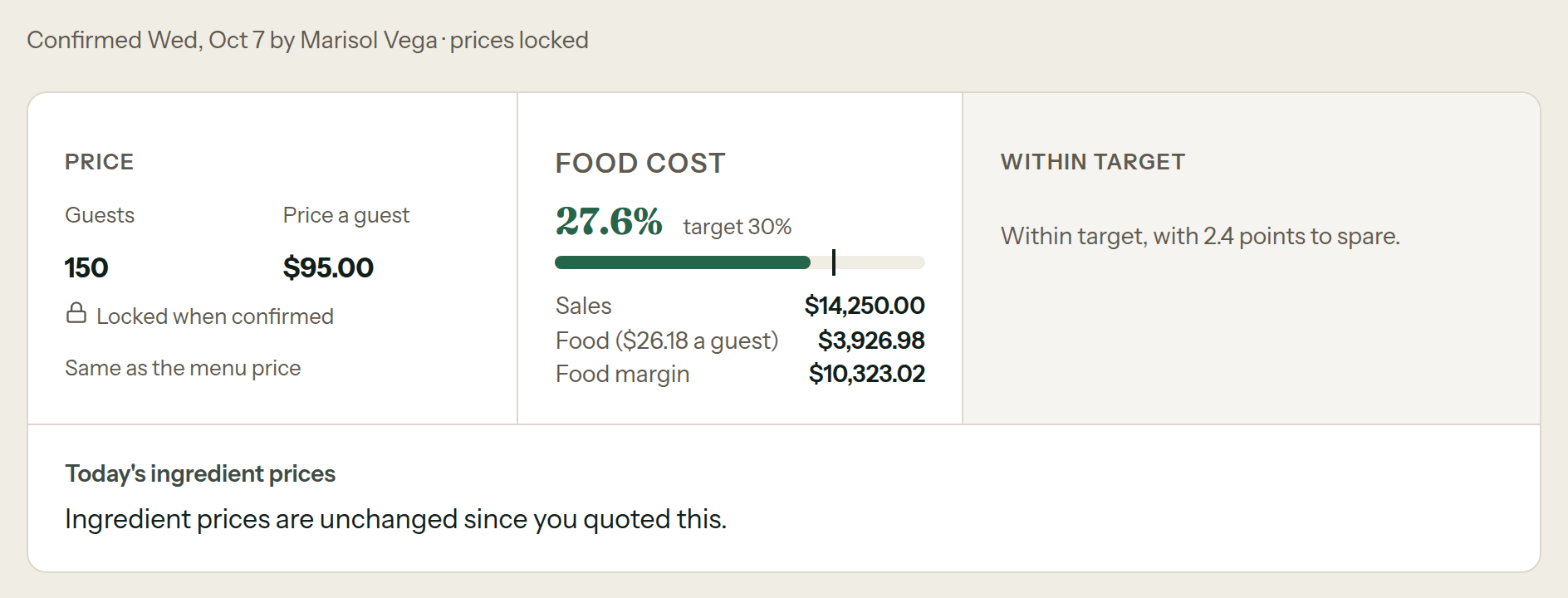
The agreed number stays put.
The confirmed quote stays frozen, with today's cost right beside it. When a supplier price moves later, you still see what you agreed to.
The job you priced is the job you cook.
Confirming does not close the book on it. The same locked event feeds Shop, Prep and Pack.
- Build menu
- Set guests
- Review cost
- Set price
- Confirm
- Shop
- Prep
- Pack
What is in Menus & Quotes.
Only what ships today for building, pricing and confirming a job.
14shipped capabilities
Quote and confirmationPrice the draft, then protect the commitment.8
- Costed before commitment. A new order is a menu, a date, guests, and a price, estimated live as you set it up.
- Pinned money bar. The numbers stay on screen while you work, and guest-count changes autosave quietly.
- Confirm freezes everything. Confirmation saves the plan, calculations and quoted price together. Later price changes do not rewrite that quote.
- Honest reopen. Reopening drops the frozen prices and goes back to today’s. Once purchasing starts, reopening is refused.
- Clean duplication. Copy an event into one draft. A double-tap cannot make two.
- Quoted vs today. Confirmed orders compare the frozen quote with current prices, and say when they cannot.
- Aged plans flagged. An old frozen plan is marked old. It is never silently recomputed.
- Frozen prep notes. Draft orders use the current prep notes. Confirmed orders keep the notes saved when you confirmed.
Frequently asked questions
What people ask before a number goes out the door.
What is menu management software?
Menu management software keeps dishes, portions per guest, the default selling price, and reusable equipment counts together. In CostCook, the menu can then become the starting point for a costed event.
How does CostCook calculate a catering quote?
A draft combines a menu, date, guest count, and price. CostCook computes the food cost per guest and food-cost percentage, then shows the price that would meet the target you set. While the price is over target, the check before Confirm order reads Fix the price.
How does the client see the price?
As a proposal on their own page: the event’s costed menu goes into it, and they accept it or ask for changes on their phone. The whole path is on the Events & proposals guide.
Can an event use a different price from the menu default?
Yes. The menu carries the default per-guest price, and an individual order can override it without changing the reusable menu.
What happens when I confirm a quote?
Confirming saves the event plan, calculations and quoted price together, and the same locked event feeds Shop, Prep and Pack.
Will later ingredient prices change the quote I already gave?
No. A confirmed event keeps its frozen prices. CostCook can compare the original quote with current prices later without silently rewriting the commitment.
Can I reopen a confirmed event?
Reopening drops the frozen prices and returns the order to current menu prices and quantities. Check the new numbers before confirming again. Once purchasing has started, reopening is refused.
Ready for the client. Ready for the kitchen.
Bring one real menu, set the head count, and follow the number all the way to the kitchen’s plan.