Catering software, built by a chef
Know the food cost before you quote the job.
For caterers and restaurants that cater. Price the job from your recipes, and the client accepts your proposal on their phone.
Watch 2-min video
One sample wedding, inquiry to food cost. 1 min 55 s, music only, every word on screen.
Read what the film shows
Know the food cost before you quote the job.
A client calls about a wedding. Write it down as it comes.
Date not decided, about 150 guests. Rough is fine.
What do I charge a head?
$95.00 a guest. Food cost 29.2%.
Under your 30% target. You know it before you send.
Can the client say yes from a phone?
The offer, on the client's phone: $14,250.00.
Accept, or ask for changes. The client decides.
Accepted, from the phone. Next, the agreement.
Signed, and deposit paid?
Deposit $3,500.00, paid by card from the link.
The balance, $10,750.00, is due Wed, Dec 9.
Signed on paper? Upload the copy. It stays with the event.
Signed and paid. Now book the event.
Booked.
How much do I order so I’m not short?
Whole packs, by supplier, for 150. What's left stays on the shelf.
Confirm, and prices and quantities lock.
Each supplier gets only its own lines.
Did it all come off the truck?
Check in the trucks. Anything short stays under Still to get.
What does the crew start on at 5 a.m.?
Bases first, then every dish: 300 portions of short rib.
Is everything in the van?
Every dish into the van, allergens on each label.
The day after, at what you paid: 28% of the price, under your 30% target.
CostCook. $49/month, per kitchen. Try it free for 15 days. costcook.io
Founding offer open now: $49/month per kitchen, locked in for life
Limited to the first 20 kitchens · Regular price $99/month per kitchen · unlimited crew
15 days free · Prices plus tax. Card required to start · $0 charged today
 Rayan Ramirez, chef and founder, cooked professionally for twelve years.
Nair & Castellano wedding
Wedding Plated Dinner
Price and food cost before the proposal goes out.
- Price per guest
- $95.00
- Food cost per guest
- $27.77
- Food cost
- 29.2% Within 30% target
- Quoted event price
- $14,250.00
- Estimated food cost
- $4,165.50
Food cost excludes staff, rentals, delivery and tax.
Three ways in, one kitchen workflow
From the first call to the shopping list.
A custom inquiry can move through proposal revisions, signature and a deposit before booking. Priced orders take a shorter route into the same kitchen work.
Custom inquiry
A client needs a tailored price.
- Price the menu and send a proposal
- Client accepts or asks for changesUpdate and resend a revision.
- Send the agreement for signature
- Request the depositClient pays by email link, or you record it.
- Book the event, then confirm the kitchen order
CostCook online ordering
On your CostCook page or a widget on your website.
- Priced request arrives
- Kitchen approves or declines
- Pay link if your booking rule asks for one
- Payment or approval confirms the order
A custom request comes to you as an inquiry instead. A deposit rule sends the balance its own pay link and one email reminder.
Saved priced menu
For a direct phone job without a proposal.
- Use the saved menu price
- Confirm the guest count and details
- Confirm the kitchen order
If the client needs an offer to accept, use the proposal route.
After confirmation, each route joins the same kitchen work
- 01PurchasingCreate supplier orders
- 02ReceivingCheck what arrived
- 03PrepPrep lists for your team
- 04PackingLabels and checklists
- 05CloseoutCompare food cost
The menu, guest count, recipes and costs stay with the kitchen order.
Food cost
See the food cost before you quote.
You quote $95 a guest. Before sending the proposal, see what each dish costs and how much of your price goes toward food.
Missing an ingredient price? CostCook flags it so it never slips in as zero.
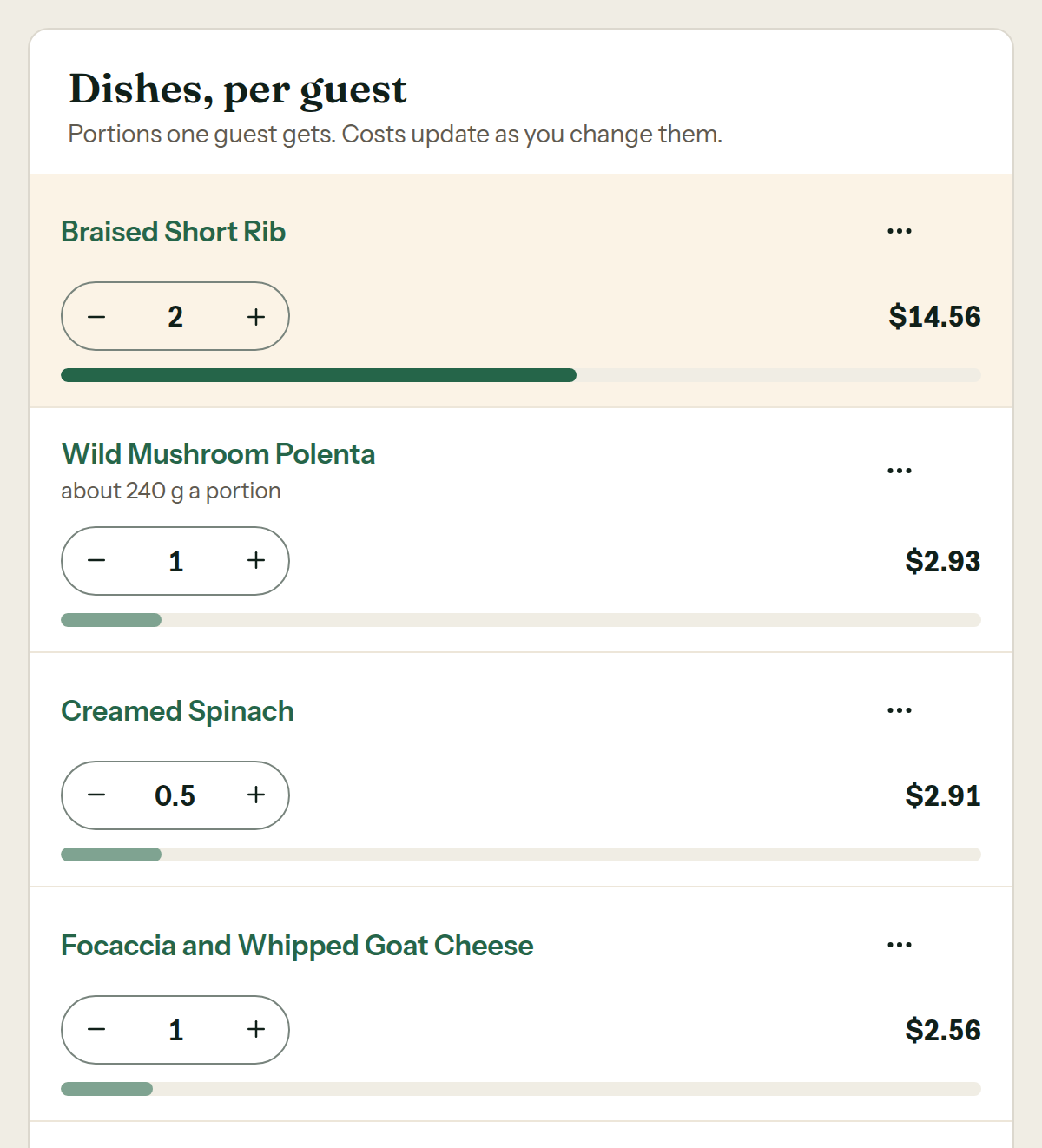
How menus and quotes are pricedDishes, per guest
Each bar shows the dish’s share of the food cost per guest.
See the current product screen
Quote with confidence
Use your recipes and current ingredient prices before you send the proposal.
Turn bookings into action
Generate purchasing, prep, and packing lists from the confirmed event.
Know what food really cost
Compare estimated food costs with the prices you actually paid.
Payments and connections
Integrations that fit your workflow.
See what connects today and what is still coming.
- PaymentsClients pay deposits and balances on StripeLive
- Supplier invoice emailSuppliers email invoices; you review themLive
- SquareCompare counter sales with today's recipe costsComing
- QuickBooks OnlineSend reviewed invoices as billsComing
- Direct label printersPrint without the browser dialogComing
Your next quote
Cost your first dish before you quote the next job.
For caterers and restaurants that cater. Start with one recipe, see your food cost before you send the price, and bring the rest of the event workflow with you when you’re ready.
Founding offer open now: 15 days free, then $49/month per kitchen, locked in for life. Limited to the first 20 kitchens. Regular price $99/month per kitchen. Unlimited crew. Prices plus tax. Card required to start; $0 charged today. Cancel in Settings.
15 days free. Charged $0 today.
Start free trial