Cost a recipe before you quote.
Ingredients, amounts, method and food cost live on one recipe. Start with one dish and what you pay for its ingredients today, and see what a portion costs.
Founding offer open now: 15 days free, then $49/month per kitchen, locked in for life. Limited to the first 20 kitchens. Regular price $99/month per kitchen; unlimited crew. Prices plus tax. Card required; $0 today. Cancel before day 16 in Settings → Billing, no call required. What to prepare · Plan and team limits
Illustrative recipe flow
- Yield
- 9 lb cooked
- Portion
- 6 oz
Ingredients
- Chicken thigh, trimmed12 lb
- Herb marinade2.4 lb
- Lemon12 each
- Pan jus1.5 qt
Roast, rest, portion, and hold for service.
- Recipe cost
- $64.69
- Per portion
- $2.70
- Food cost
- 30.0%
How the chicken line adds up
- Purchased amount13.2 lb
- Trim yield91%
- Cost contribution$46.02
Right now one dish lives in three places.
The method is in a binder. The current case price is in a purchase record. The quote is waiting in a spreadsheet. That works fine until the kitchen and the client both need an answer the same afternoon.
One recipe, from first draft to prep sheet.
Write the dish down while it is still in your hands. Ingredients, prep, yield, sub-recipes and the version the kitchen should cook from all stay on one recipe.
Chicken thigh 40 lb
Herb marinade 8 lb
Roast until browned. Rest before portioning.
24 portions · 6 oz eachBuild without leaving the recipe.
Type, pick, next line. Missing an ingredient? Add it right there without losing what you have built.
Scale it and leave the original alone.
Preview a bigger or smaller batch, or work from what you have on hand. The saved recipe stays exactly as you left it.
Print a sheet that says how old it is.
The kitchen sheet prints with the time on it.
You pick the version the kitchen cooks from.
Build it in private. Once it passes the ready check, you publish it, and the crew gets a kitchen view they can read but not edit. Earlier published versions stay there when you need to see what changed.
- 01Draft
Private while the recipe is still being built.
- 02Ready
Required recipe facts are checked before publishing.
- 03Published
Everyone can see which version is current.
- 04Kitchen view
The crew reads the method. They cannot edit it.
- 05History
Earlier published versions stay available to read.
File it the way the kitchen looks for it.
Collections, tags, stations and shelves. When the book gets big, there is more than one way back to a recipe.
- Collections
- Tags
- Stations
- Shelves
Keep the method in steps.
Structured method steps move up and down, so the method never turns into one long paragraph.
Follow one case price to the plate.
A case price tells you little until the pack size, the trim yield, the sub-recipe, the portion and the head count have had their say. Every step stays open so you can check it.
- 1Case
What the supplier charged for the whole pack.
- 2Unit
The price per pound, quart, or each.
- 3Edible
What survives the trim.
- 4Plate
That ingredient’s share of one dish.
- 5Event
The food cost you hold the quote up against.
Show the math.
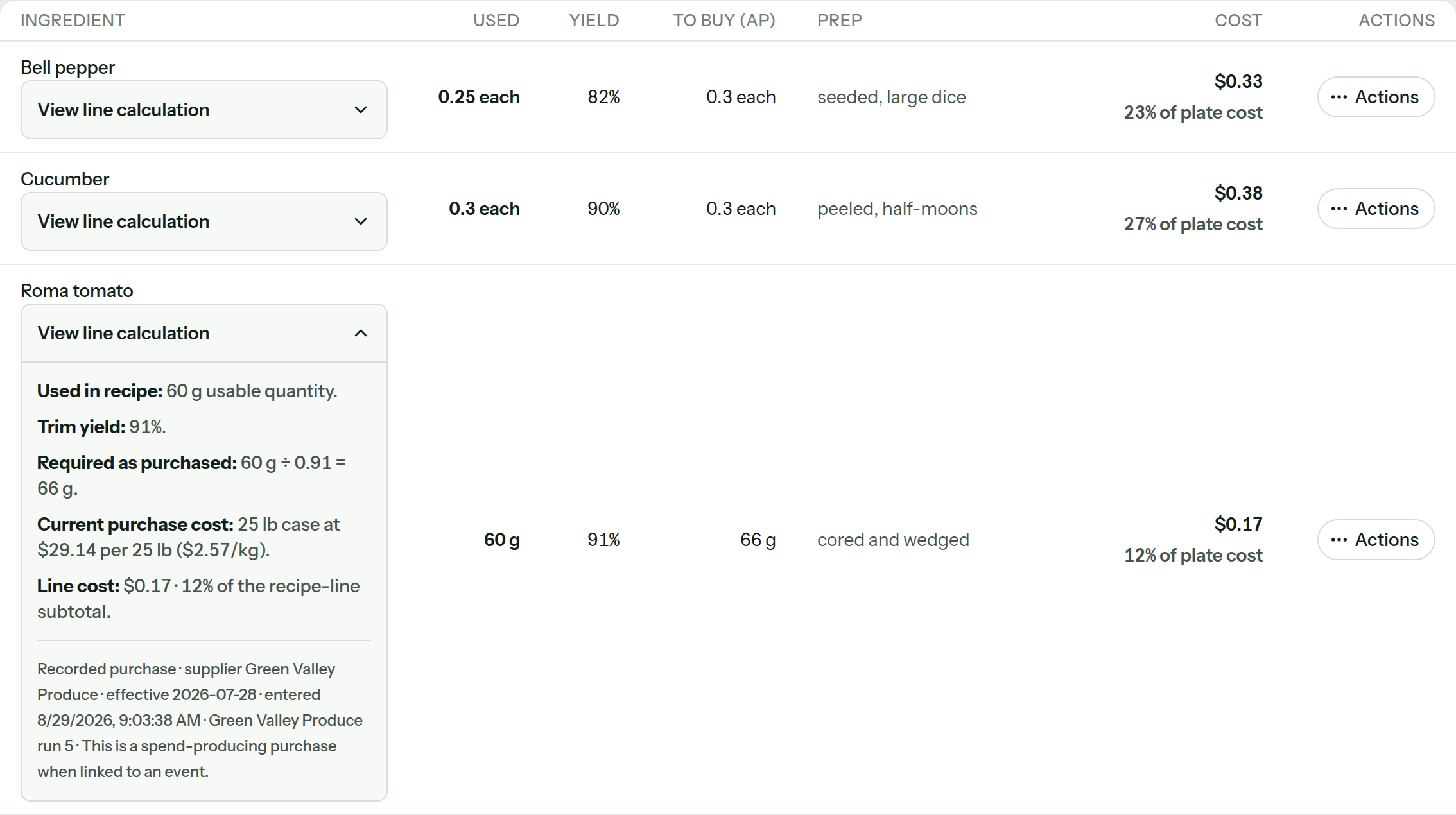
What you bought, the yield, how much to buy, the prep state and what the line adds to the cost all sit together. Open any of it and trace the number back.
- Missing prices are named instead of reading as zero.
- Every line adds up to the recipe total.
- Trim and cooking loss remain separate facts.
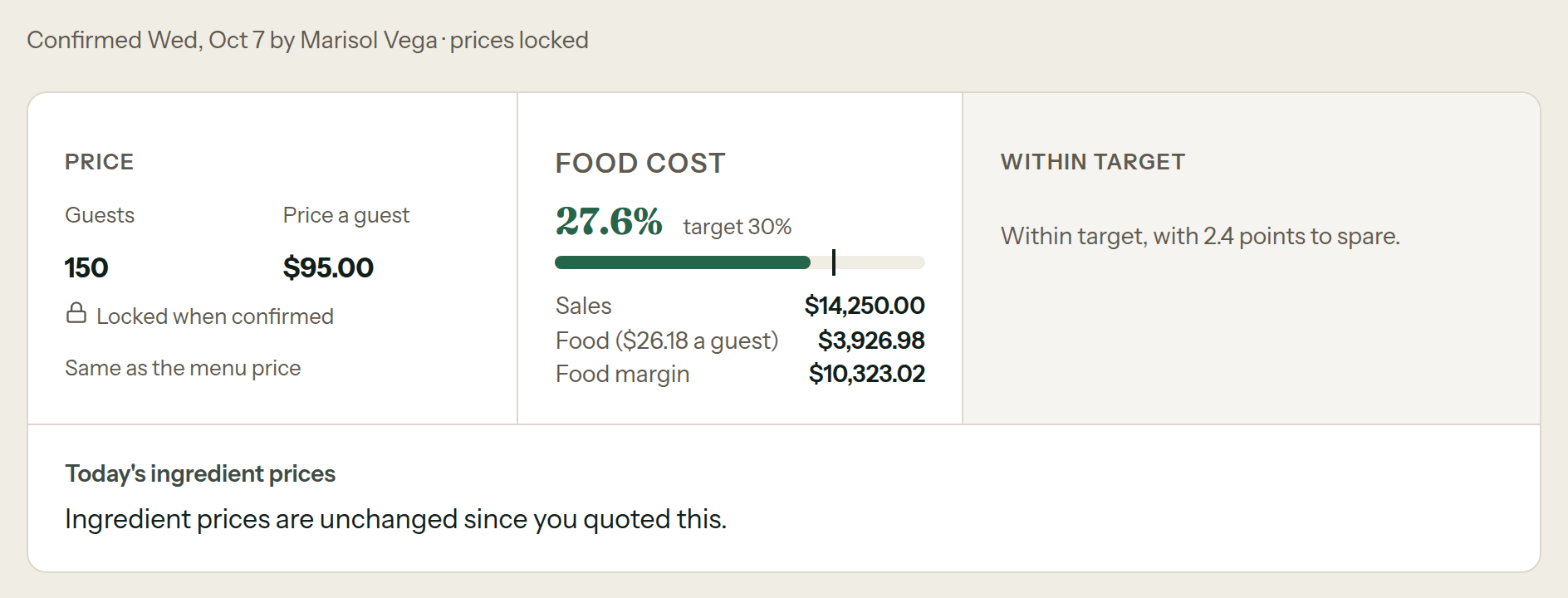
The frozen quote, next to today's prices.
Before you confirm, see cost per guest next to what you plan to charge. After you confirm, the quote stays frozen and you can hold it up against today's prices.
A sauce is one recipe, even in five dishes.
Cost the batch once and use it wherever it goes. When something in it changes, you see which recipes and menus it touches before you decide what to do.
- Roast chicken
- Grain bowl
- Lunch box
- Canapé tray
- Family meal
What is in Recipes & Costing.
Open the details to check what is available today.
49shipped capabilities
RecipesFrom private draft to the sheet the kitchen cooks from.14
- One-screen builder. Type, pick, next line. Autocomplete stays under your thumb.
- Live pricing. Set the selling price and the food-cost percent moves as you type, with a nudge when you are over target.
- Private drafts. A blank recipe stays out of the catalog until its first valid save.
- Duplicate. Copy a recipe with its costing facts intact.
- Draft to kitchen view. Readiness checks stand between a private draft and the published version the kitchen opens.
- Earlier published versions. Read the recipe history and open an earlier published version without replacing the current one.
- Filed for the kitchen. Collections, tags, stations and shelves keep a growing recipe book findable.
- Structured methods. Write and reorder method steps instead of burying the working sequence in one paragraph.
- Archive and restore. Owners can publish, archive and restore recipes.
- Learned yield. CostCook proposes yield corrections from your own buying evidence. You apply or reverse, and the evidence is kept.
- Usual ingredient yield. New recipe lines use the ingredient’s usual yield. Existing lines keep their saved yield.
- CSV export. Download one recipe or the whole recipe book as a CSV spreadsheet you can import again.
- Print sheets. A recipe prints clean, stamped with when it was printed.
- Checked deletes. Removing a recipe checks what uses it first.
The costing mathFrom recipe quantities to food cost, with the working shown.14
- One connected plan. Menu times guest count becomes what to buy, cook, and pack, with the cost attached.
- Real unit conversion. Weight, volume, and count convert only through facts you set per ingredient, never a global guess table.
- Whole batches. Batches round up to whole ones and the plan says made and needed, so nothing pretends to be exact.
- Two kinds of yield. Trim loss and cooking loss are separate numbers, and each recipe line says which state its quantity means.
- Byproduct credit. Bones and trim you use elsewhere credit back against the ingredient’s usable cost.
- Missing prices are named. Uncostable lines are listed, and partial totals say what is missing instead of showing zero.
- Lines that add up. Every line’s cost contribution adds up to the total. No silent remainder.
- Misc is its own line. Miscellaneous cost is visible and applied once, never buried in a dish.
- Tap-to-see arithmetic. Any plate cost or food-cost percent opens the math behind it.
- Consistent target warnings. Over target reads the same words on every screen.
- Amounts in cents. Costs are calculated in cents so the displayed amounts add up.
- Your units. Quantities print metric or US, rounded the way a cook reads them.
- Scaling preview. Scale a recipe by target amount or by what you have on hand. The saved recipe never changes.
- Sub-recipes checked. Reuse a sauce or other sub-recipe in dishes. A recipe cannot include itself, even through another recipe.
IngredientsWhat you pay for an ingredient lives on the ingredient.15
- Missing ingredient details. See which ingredients can be costed and which need a price, yield or conversion.
- Shareable filters. Bookmark or share a filtered ingredient list and reopen the same search.
- Fix a price in place. Edit a pack cost right from the list without losing your filters.
- Three ways to add an ingredient. Create from scratch, from the USDA reference, or from a purchase. Unit and yield are your choice, never a guess.
- Mid-recipe creation. Add a missing ingredient from inside the recipe builder without losing what you typed.
- Suppliers anywhere. Add a supplier from any screen that needs one. Same form, same result.
- Purchased vs usable. Each ingredient shows both costs side by side, with its purchase history underneath.
- Compare suppliers. Compare supplier offers per usable pound, kilo or item, cheapest first. Choose which price to use.
- Price source. Every current price says where it came from, from which supplier, effective when.
- Affected recipes and menus. Before a price changes, see every recipe and menu it touches.
- Check before deleting. Before deleting an ingredient, check the recipes that still use it.
- CSV import. Bulk ingredient import with a template whose example rows actually pass.
- USDA reference built in. Yields, densities, and unit weights offered as chips you tap to fill.
- Allergens. Tagging for the nine major US allergens rolls up to every recipe, with chef overrides that require a written reason.
- Shelf facts. Storage areas and par levels live on the ingredient. An unset par is unset, not zero.
Frequently asked questions
What people ask before they bring a real recipe in.
What is recipe management software?
Recipe management software keeps ingredients, method, yield, sub-recipes, scaling, and the kitchen-ready version together. In CostCook, that means the recipe the kitchen reads is also the record used for costing.
How does recipe costing work in CostCook?
CostCook follows the purchase price through pack size, trim yield, recipe quantity, portion, and guest count. You can open the arithmetic behind a plate cost or food-cost percentage instead of accepting an unexplained total.
Can I scale a recipe without changing the original?
Yes. Scale by a target amount or by what you have on hand, then use the recalculated quantities as a preview. The saved recipe stays unchanged.
What happens when a yield or ingredient price is missing?
Trim loss and cooking loss remain separate facts. If a line cannot be costed, CostCook names the missing price and labels the total as partial instead of quietly treating the ingredient as free.
Can I reuse sub-recipes and hand recipes to the kitchen?
Yes. A sauce or other sub-recipe can feed several dishes without copying its costing facts into each one. Recipes can also be exported to CSV or printed as clean kitchen sheets stamped with the print time.
Can I see an earlier published recipe?
Yes. Recipe history keeps earlier published versions available to read. The current published version remains clear, so opening history does not silently replace what the kitchen uses.
Will a later price change rewrite a confirmed quote?
No. Confirming an order freezes its plan, math, and money together. CostCook can compare that frozen quote with current prices later without silently rewriting what you originally quoted.
Start with the dish you sell most.
Bring that dish and follow it from recipe to quote, with the math showing.